What does Google know about me? How to see, control, and delete your data


Every time you perform a Google search, watch a video on YouTube, use Google Maps, or interact with apps tied to your Google account, Google can collect information about these interactions.
Over time, this creates a detailed profile of your habits, interests, and routines, which are used to personalize ads and recommend services.
The amount of data online services collect can raise privacy concerns. This article explains what Google knows about you, how that data is used, and what it means for your privacy.
What data does Google have on you?
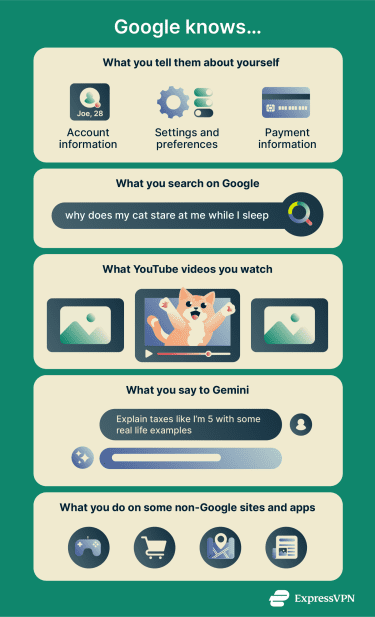
Big Tech companies like Google collect a wide range of data. Here are some important pieces of information that Google has on you:
- Google account information: Including your name, email address, contact details, settings, preferences, and payment information.
- Internet search and watch history: Google records your search history and the videos you watch on YouTube.
- Email and stored content: Google processes information you send, receive, or store using services like Gmail and Google Drive.
- AI interactions: This includes your conversations with Google Gemini and Google Assistant, such as your prompts and the responses you receive.
- IP address: Your IP address is a number that identifies your internet connection. It can reveal your general location and help websites recognize your device online.
- Device and browser information: Google may know your device model, operating system, browser type, and settings.
- Activity on other websites and apps: Google collects information from non-Google sites or apps that use its services. This can include pages you visit, links you click, time spent on a site, and interactions with ads.
What Google does with your data
Google uses the data it collects for several purposes, including:
- Delivering its services: Some data is needed for Google’s products and services to function. For example, your device’s IP address helps load websites and videos, cookies keep you signed in and remember your settings, and Maps data enables features like directions and saved places.
- Security: Data is used to protect Google accounts and services from abuse. Google may use information like your IP address, device type, and usual sign-in locations to watch for suspicious activity, such as someone trying to access your account from an unexpected device or location.
- Ad personalization: Google may use data about your browsing activity and general location to show ads relevant to your interests. For example, frequent searches for hiking gear may lead to ads for outdoor equipment.
- Search and recommendations personalization: Google uses your past activity to personalize search results and recommendations. For example, a search for “apple” may return results about the company or the fruit depending on your previous activity.
- Improving Google’s AI: Your conversations with Google Gemini may be used to help train and improve its AI systems.
- Sharing with third parties: Google may share data with organizations outside the company, such as service providers that support its products or authorities when required to meet legal obligations.
How Google collects data about you
Here are the main ways Google gathers information from its users:
- User-provided information: You provide Google with information when creating or using a Google account or services.
- Activity within Google services: Google records your interactions on its services, including Search, Maps, and YouTube.
- Third-party usage of Google services: Many sites and apps use tools like Google Ads and Google Analytics, which generate and transmit data to Google.
- Cookies and similar technologies: These are tools that companies (including Google) use to recognize your device or browser and connect your activity across sites, sessions, and services.
- Automatic system signals: Your device, browser, and apps automatically transmit technical information to Google when you access its services.
How to see what Google knows about you
Google allows you to review the information it knows about you, including your activity, ad preferences, and stored data.
How to check your Google activity
Make sure you’re logged into your Google account and visit My Google Activity.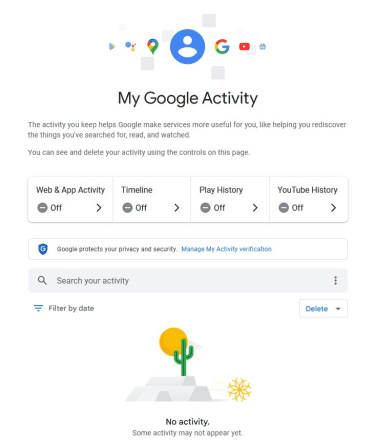
This page shows what Google knows about your activity, including:
- Web & App Activity: Google saves your activity on its services, such as Search, Chrome, Maps, and Assistant. Depending on your settings, it might also have your Chrome browsing history and record your interactions with ads or Google-powered features on other sites and apps.
- Timeline: This setting is disabled by default. But if it’s enabled, Google regularly saves your Android, iPhone, or iPad’s precise location to your device.
- Play History: Google records your activity on Google Play, including searches and app usage. Apps may also share certain information with Google.
- YouTube History: Google records your YouTube search and watch history.
How to review your ad personalization profile
Visit My Ad Center. Under the Manage Privacy tab, it shows what Google has inferred about you and your interests, based on your activity across Google services and other sites and apps, as well as your interactions with ads.
Privacy tip: You can turn off ad personalization in My Ad Center using the dropdown menu in the top-right corner. This will stop Google from tailoring its ads to you using your personal information. However, this doesn't reduce the amount of ads you see or stop Google from collecting your personal information.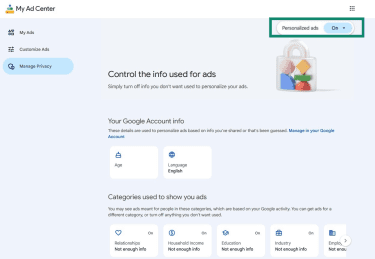
How to download your Google data
Downloading your data is another way to see the kind of information Google stores about you. It’s also a way to back up your data or transfer it to another service.
To download your Google data, visit Google Takeout and select the data you’d like to download. For example, you can download your Chrome bookmarks and history, contact data, and any files you’ve stored in your drive.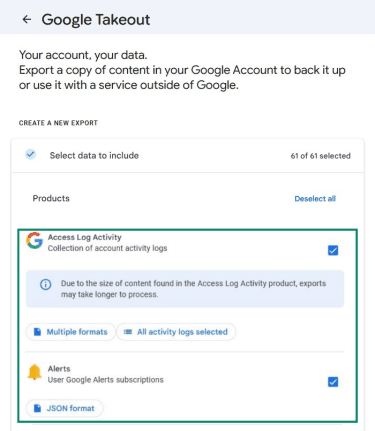
Once you select the data you want to download, you can choose how to receive it. You can have it sent to your email or saved to your Google Drive. You can also schedule automatic exports and choose the file format, such as ZIP or TGZ. Once decided, click Create export to receive your data.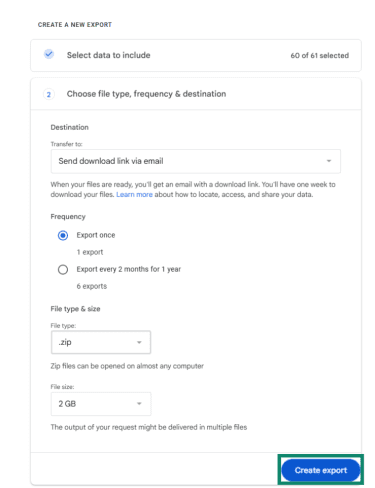
How to control the data Google collects
You can also limit the data Google collects on you. The easiest way to do this is by using Google’s own privacy settings.
Turn off activity data collection
- Go to My Google Activity and click Web & App Activity.
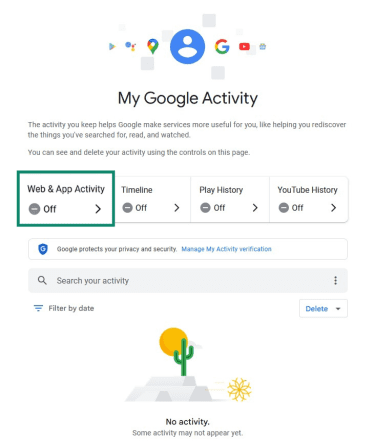
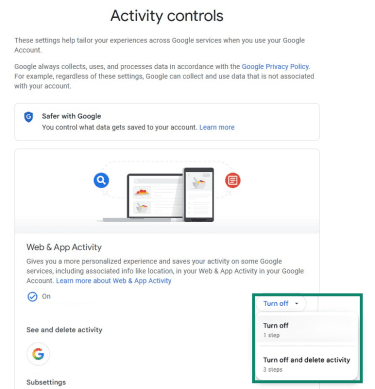
- Click Turn off and then, in the dropdown menu, click Turn off again. If you’d like to delete your activity data at the same time, select Turn off and delete activity instead. This will delete the information Google has already collected on you.
- Go back to My Google Activity and do the same for Timeline, Play History, and YouTube History.
Turning these settings off stops Google from saving certain types of activity to your account, but it doesn’t stop all data collection. Google may still collect other information needed to provide and maintain its services.
Delete your activity data
If you’d like to delete your Google search history and other activity data without turning off data collection:
- Go to My Google Activity, open the hamburger menu (3 horizontal lines) on the top left, and click Delete activity by.
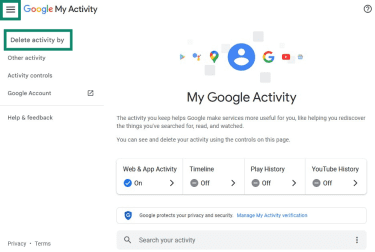
- Select the appropriate option.
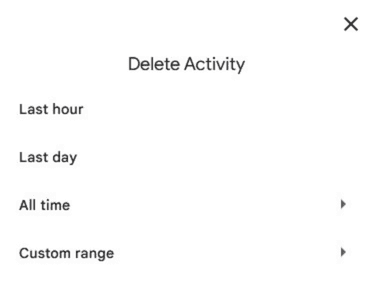
Note: There’s no confirmation screen once you've done this.
How to set up auto-delete for your data
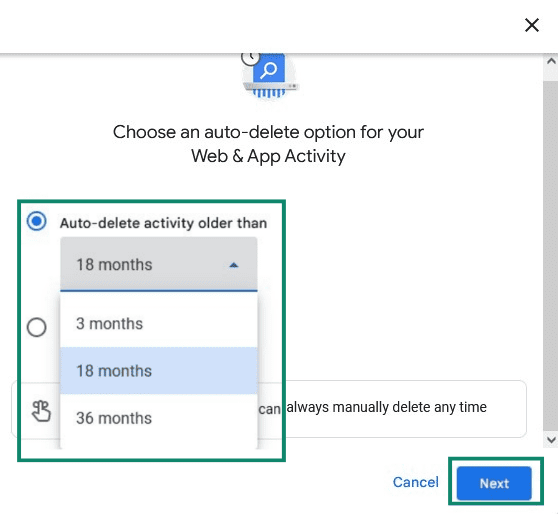
You can set it up so that activity data older than 3, 18, or 36 months are automatically deleted. To do so:
- Go to My Google Activity, and click Web & App Activity. Under Auto-delete (Off), click Choose an auto-delete option.
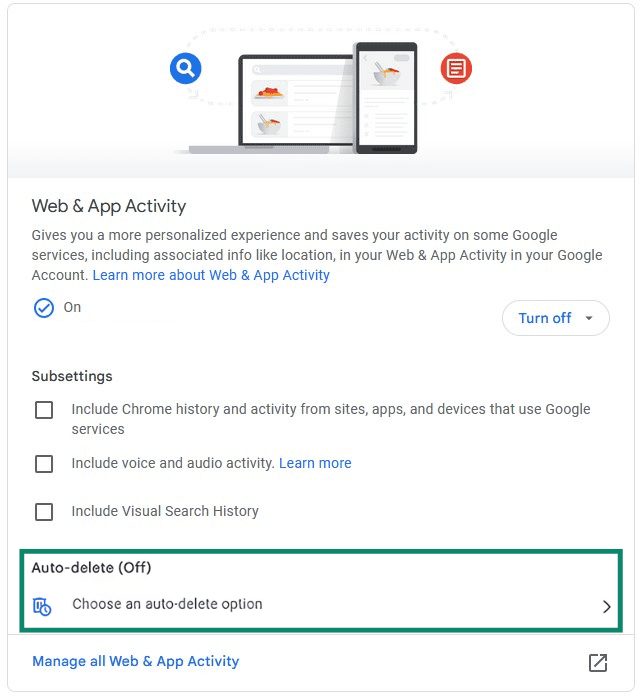
- Select Auto-delete activity older than, select the appropriate option, and then click Next, and follow the confirmation prompts.
Turn off Keep Activity on Gemini
For users ages 18 or over, a setting called “Keep Activity on Gemini” is turned on by default. This means your chats with Gemini will be used to train Google’s AI models and might be reviewed by humans. It’s possible to turn this off.
Before you turn it off, though, be aware that it will delete any past chats that haven’t been processed yet, and you’ll no longer have the chat history function in Gemini.
To turn Keep Activity off, visit Gemini Apps Activity, click On to open the dropdown menu, and then click Turn off. If you’d like to delete your activity data at the same time, select Turn off and delete activity instead.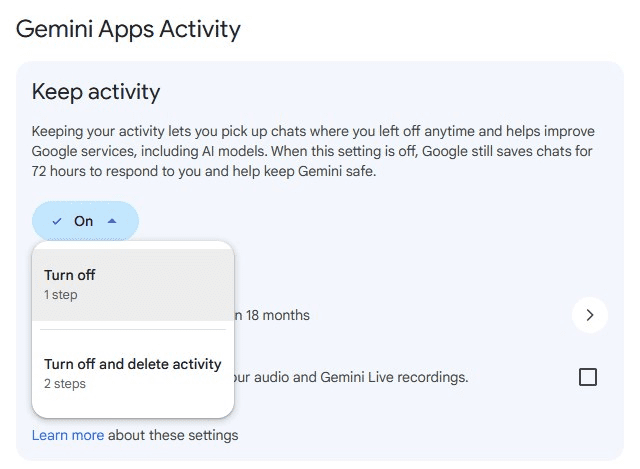
Note: Even if you turn off “Keep Activity,” your chats are saved for up to 72 hours. This is so Gemini can respond to you and to help protect Google and its users.
How to protect your privacy while using Google
Besides turning off activity data collection and deleting your activity data, here are some other ways to reduce online tracking and improve your data privacy while using Google products and services.
Safer ways to use Google services
There are a few simple behavioral changes that can limit how much Google knows about you:
- Avoid sharing sensitive personal information: Anything you enter into Google Search may be used to personalize your results in the future. Additionally, your AI interactions may be reviewed by humans unless you turn Keep Activity off.
- Use private browsing modes: Most popular browsers offer an incognito or private mode. This doesn’t make you invisible online. But it does prevent your browsing history, cookies, and information you enter into forms from being saved on your device or carried over into future browsing sessions.
- Sign out of your Google Account: While you’re signed in, your activity across different Google services can be linked to your account. If you use “Sign in with Google” on other websites or apps, that activity may also be associated with your Google identity.
Tools that limit data collection
You can also use third-party tools to reduce tracking and make it harder for Google to build a detailed profile of your activity. Here’s a quick overview of some helpful privacy apps, extensions, and services:
- Tracker blockers: These browser extensions can block third-party tracking scripts used by Google services on other websites and limit tracking cookies. They can also guard against techniques like browser fingerprinting that are used to identify your device across websites.
- Privacy-focused browsers: Chrome is tightly integrated with Google services and can share certain usage data when you’re signed in or using features like sync, depending on your settings. You can reduce the risk to your privacy by choosing a different browser. Privacy-focused browsers like Firefox also include built-in tracking protection features.
- Alternative search engines: Consider using a more private search engine than Google, for example, one that doesn’t use your search queries to build a personal profile of you.
- Virtual private networks (VPNs): VPNs like ExpressVPN mask your IP address, which can make it harder for Google to infer your general location and may reduce location-based personalization. Do note, though, that some Google services use other signals to determine your location, such as GPS, Wi-Fi location tracking, or account-based tracking.
FAQ: Common questions about Google data collection
How long does Google keep your data?
Does incognito mode stop Google from tracking you?
Can Google see what you do on other websites?
Additionally, even if you don’t sign in with Google, many websites use Google services like Google Ads or Google Analytics, which collect information about your visit (such as page views, clicks, IP address, and device information) and send it to Google’s systems.
Does deleting your activity improve your privacy?
Can you use Google without sharing too much personal data?
Take the first step to protect yourself online. Try ExpressVPN risk-free.
Get ExpressVPN