
Expressvpn Glossary
Network connectivity
What is network connectivity?
Network connectivity refers to the ability of devices to communicate with one another across a network. It underpins most digital interactions, from loading a webpage to transferring files.
How does network connectivity work?
Connectivity relies on a layered system of network protocols, addressing, and hardware working together to move data from one device to another.
Every device on a network is assigned an IP address, a unique identifier that tells other devices where to send data. When data is transmitted, it’s broken into small units called packets, each labeled with a source and destination IP address.
Routers read the destination IP address on each packet and compare it against a routing table, a map of known network paths, to decide where to forward it next. This happens hop by hop, from one router to the next, until the packet reaches its destination.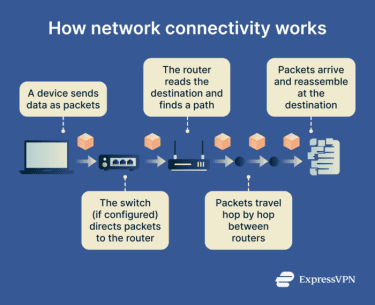
In addition to routers, switches also play a role in how data moves. They connect multiple local devices, such as computers and printers, and direct traffic between them before forwarding packets to the router when data needs to travel beyond the local network.
Types of network connectivity
Network connectivity can be broadly categorized into two groups: wired and wireless. Wired methods favor stability and speed, while wireless options offer mobility and convenience.
Wired connectivity
- Fiber-optic: Uses pulses of light through glass or plastic strands to deliver high bandwidth and low latency, making it the fastest wired option.
- Ethernet: Copper-based cables that connect devices in homes and offices. It’s reliable but generally slower than fiber.
- Asymmetric Digital Subscriber Line (ADSL): ADSL uses telephone lines to provide internet access. It offers lower speeds than fiber and Ethernet.
Wireless connectivity
- WPAN (Bluetooth): A short‑range personal‑area network that connects devices.
- WLAN (Wi‑Fi): Provides wireless access around homes, offices, and campuses.
- WMAN (WiMAX): Extends Wi‑Fi‑like connectivity across metropolitan areas.
- WWAN (cellular): Uses 4G and 5G networks to deliver long‑range mobile connectivity.
Risks and privacy concerns
Data transmitted across a network can be intercepted or exposed at multiple points, including at the sending device, in transit between routers, or at the destination server. Common risks include:
- Misconfigurations: Incorrectly configured routers, switches, or access controls can expose networks to unauthorized access or cause traffic to be routed incorrectly.
- Network outages: Hardware failures, internet service provider (ISP) disruptions, or overloaded infrastructure can interrupt connectivity and make data unavailable.
- Data leaks: Unencrypted traffic or poorly secured systems can expose sensitive data in transit or at rest.
- Attacks: Networks can be deliberately targeted through attacks like denial of service (DoS) attacks that overwhelm infrastructure.
Further reading
- Network connections: Everything you need to know
- How to check your internet connection
- What is computer networking and how VPNs fit in
- What is network discovery? How to enable it safely